
Overview
Webhooks are a way for you to write custom code that runs when:
- New cards are scanned
- The scanner is paused or resumed
This enables powerful automation possibilities. For example, you could:
- Build a machine that physically moves cards in and out of Delver as they’re scanned
- Auto-populate a spreadsheet with scanned card data
- Trigger custom workflows when cards are added or modified
Note: Webhooks are a Pro feature. You can enable and test the functionality for free, but you’ll need an active subscription to receive actual card data. Visit delver.app/#pricing for subscription information.
Delver Webhook Server
The Delver Webhook Server receives webhook requests from Delver and holds the information until you retrieve it. This allows you to use webhooks without worrying about HTTPS or CORS.
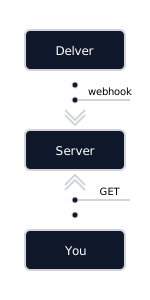
Enable Webhook Server
Navigate to Main Screen -> Side Menu -> Settings -> Advanced -> Delver Webhook Server.
Click the Generate button to generate a new endpoint.
That’s it! You’re all set.
Test Webhook Server
You can test it out directly by pasting the endpoint into a browser. The first response the browser will show is:
{ "type": "endpoint_created" }If you refresh the browser, the server will wait up to 10 seconds and then timeout with response code 404 and the following json:
{ "type": "not_found" }Now scan a couple of cards with Delver and refresh the browser again. You should see a json indicating the scanner started and cards that have been scanned.
Note: The endpoint is open and only secured by the endpoint URL. Ensure the URL remains secret. Generate a new one if you suspect it has been compromised. Don’t put on Github!
Enable Webhooks (Advanced)
Navigate to Main Screen -> Side Menu -> Settings -> Advanced -> Enable Webhooks.
Still under Settings, set the Webhook Endpoint to the URL of your server.
Except for localhost, the endpoint must use HTTPS and must return CORS headers.
HTTPS
Enabling HTTPS requires advanced knowledge of IT infrastructure. You can use this tutorial to deploy certificates in your local network (link). You can also use proxy services like ngrok.
CORS
Remember to set CORS headers in your response.
{
	"Access-Control-Allow-Origin": "*",
	"Access-Control-Allow-Methods": "POST, OPTIONS"
}
Alternative to HTTPS and CORS
If you’re not confident or don’t have the time to setup HTTPS, use the Delver Webhook Server. It was designed to be used in place of you developing your own server.
Types of Requests
Delver X sends webhook requests during active card recognition sessions.
Webhook Server Responses
When using the Delver Webhook Server, you may receive the following response types:
The following response indicates that your endpoint was successfully created in the webhook server. You’ll see this only when first accessing a newly generated endpoint URL.
{
	"type": "endpoint_created"
}
The following response (with HTTP status code 404) occurs when polling the server but no new events are available within the 10-second timeout period.
{
	"type": "not_found"
}
Scanner Status
When you open the recognition page and scanning becomes active:
POST /<HTTP Post Endpoint>
{
	"type": "scanner_started"
}
When scanning is paused or you navigate away from the scanning page:
POST /<HTTP Post Endpoint>
{
	"type": "scanner_paused"
}
Card Events
When a new card is scanned:
POST /<HTTP Post Endpoint>
{
	"type": "card_scanned",
	"cards": [{
		"cardId": 6128,
		"quantity": 1,
		"name": "Birds of Paradise",
		"edition": "Secret Lair Drop",
		"number": "92",
		"priceUser": "",
		"fmtPriceUser": "-",
		"priceAcquired": 0.0,
		"condition": "",
		"language": "",
		"listName": "Temporary",
		"listType": -1,
		"board": 0,
		"manaCost": "<svg version=\"1.1\" viewBox=\"0 0 600 600\" xmlns=\"http://www.w3.org/2000/svg\"><circle cx=\"300\" cy=\"300\" r=\"300\" fill=\"#9bd3ae\"/><path d=\"m562.6 337.4c0 10-3.9 19-11.6 27s-16.6 12-26.6 12c-16 0-27.7-7.5-35.2-22.5l-35.2-1.5c-7.5 0-22.3 3.3-44.2 9.8-23.5 6.5-37 11.7-40.5 15.7-5.5 6-10 20-13.5 42-3 18-4.5 31.2-4.5 39.7 0 13.5 2.1 23.4 6.4 29.6s13 11.5 26.2 15.7 21.4 6.6 24.4 7.1c2 0 5.2-0.2 9.8-0.7h9c6.5 0 13.2 1 20.2 3 10 3 14.3 7 12.8 12-7-1-19.2 0.5-36.7 4.5l21 10.5c0 6-8.5 9-25.5 9-4.5 0-10.6-1-18.4-3-7.7-2-12.9-3-15.4-3h-9.7c-0.5 5-2 12.5-4.5 22.5-8.5-0.5-18.5-5.5-30-15s-18.7-14.2-21.7-14.2-7.3 4.8-12.7 14.2c-5.5 9.5-8.2 16-8.2 19.5-6.5-3.5-12-10-16.5-19.5-2-6.5-4.2-13-6.7-19.5-5 0.5-14.2 11-27.7 31.5h-3.8c-1-1.5-4.8-12-11.2-31.5-15.5-5-30-7.5-43.5-7.5-6.5 0-16.5 1.5-30 4.5l-21-1.5c3-3 11.7-8.7 26.2-17.2 17-10 30-15 39-15 1.5 0 3.5 0.3 6 0.8s4.5 0.8 6 0.8c3.5 0 9.1-1.9 16.9-5.6 7.7-3.7 12.2-7.1 13.5-10.1s1.9-10.8 1.9-23.2c0-28.5-7.5-49.7-22.5-63.7-13-12.5-34.5-21.5-64.5-27-8 28.5-30.5 42.7-67.4 42.7-12 0-24-7.2-36-21.7-12.3-14.8-18.3-28-18.3-40 0-18.5 7.7-33.7 23.2-45.7-12.5-13-18.7-26.2-18.7-39.7 0-12.5 3.9-23.5 11.6-33s17.9-15 30.4-16.5c-1-16 4.2-27 15.7-33-5.5-5.5-8.2-15.2-8.2-29.2 0-16.5 5.5-30.2 16.5-41.2s24.7-16.5 41.2-16.5c18 0 32.7 6.3 44.2 18.8 14.5-49.5 45.7-74.2 93.7-74.2 25 0 47 10 66 30 7 7.5 10.5 11.5 10.5 12-6 0-3-1.1 9-3.4 12-2.2 20.7-3.4 26.2-3.4 19.5 0 36.7 7.2 51.7 21.7 13 13 22 29.5 27 49.5 3.5 0.5 9 2 16.5 4.5 11 5.5 16.5 15 16.5 28.5 0 2.5-2 7.3-6 14.2 32 18 48 43 48 75 0 9-3.5 21.5-10.5 37.5 13 7.5 19.5 18.5 19.5 33m-308.8 33v-9.7c0-11.5-5.6-22-16.9-31.5-11.2-9.5-22.6-14.2-34.1-14.2-14 0-27 3.2-39 9.7 26.5-1.5 56.5 13.8 89.9 45.7m-13.5-92.9c-7.5-8.5-14-17.2-19.5-26.2-21 5.5-31.5 11.7-31.5 18.7 6-0.5 14.7 0.6 26.2 3.4s19.7 4.1 24.8 4.1m45.7-23.2v-33c-12-2-19.3-3-21.7-3v11.2l21.7 24.7m97.4-21c-6-2.5-17.2-7.5-33.7-15v64.5c23.5-13.5 34.7-30 33.7-49.5m41.2 88.5-16.5-20.2c-10 7-20.1 14.1-30.4 21.4-10.3 7.2-19.1 15.4-26.6 24.4 22.5-12 47-20.5 73.4-25.5\" fill=\"#00160b\"/></svg>",
		"type": "Creature — Bird",
		"artist": "Ovidio Cartagena",
		"legal": "mlvyhbc",
		"restricted": "",
		"rules": "Flying\n<svg width=\"100\" height=\"100\" enable-background=\"new -945 -210.002 1045 730.002\" version=\"1.1\" viewBox=\"-945 -210 100 100\" xml:space=\"preserve\" xmlns=\"http://www.w3.org/2000/svg\"><g transform=\"translate(0 -525)\">\t<circle cx=\"-895\" cy=\"365\" r=\"50\" fill=\"#cac5c0\"/><path d=\"m-859.67 373.92h-36.004l13.185-9.383c-4.898-3.887-10.566-5.828-16.984-5.828-3.211 0-5.414 0.613-6.59 1.836-1.184 1.227-1.777 3.445-1.777 6.654 0 8.873 4.563 18.34 13.691 28.396l-10.391 10.521c-12.09-14.705-18.129-27.844-18.129-39.424 0-6.928 2.086-12.447 6.27-16.545 4.18-4.098 9.746-6.148 16.668-6.148 8.453 0 17.664 3.215 27.641 9.635l7.728-13.182z\" fill=\"#0d0f0f\"/></g></svg>: Add one mana of any color.",
		"rulings": "",
		"reserved": "0",
		"altCardId": 0,
		"imageId": -1,
		"dataCardId": 53574,
		"editionId": 586,
		"rarity": "R",
		"editionCode": "sld",
		"finish": "regular",
		"deleted": 0,
		"uuid": "EF4A084815A24007A93A697EFB7B6E84",
		"cardType": "Creature — Bird",
		"imageUuid": "",
		"nameId": 151,
		"listUuid": "51B2A9169E35442AA413EDCEA3E1B297",
		"scryfallId": "fdfeeb64-0f86-45e9-97e3-dcec72683164",
		"price": 8.359999656677246,
		"fmtPrice": "$8.35",
		"priceVariation": 0.0,
		"fmtPriceVariation": "↓ $0.00",
		"tcgMid": 8.359999656677246,
		"fmtTcgMid": "$8.35",
		"mkmTrend": 9.489999771118164,
		"fmtMkmTrend": "$9.49",
		"ckRetail": 10.989999771118164,
		"fmtCkRetail": "$10.99",
		"ckBuylist": 0.0,
		"fmtCkBuylist": "-",
		"chRetail": 0.07999999821186066,
		"fmtChRetail": "0.08 TIX"
	}]
}
Note: If you don’t have Delver Pro, “Birds of Paradise” is returned.
Sample Code
Here’s a simple example that polls the Delver Webhook Server endpoint continuously. To install the dependencies, run pip install requests.
import requests
import time

# Paste the endpoint URL here
webhook_url = "https://api.delver.app/webhook/quick-brown-fox-jumps-over-the-lazy-dog"

def poll_webhook_server(endpoint_url):
    while True:
        try:
            response = requests.get(endpoint_url)
            if response.status_code == 200:
                data = response.json()
                print(f"Received event: {data}")
            elif response.status_code == 404:
                print("No new events")
            else:
                print(f"Unexpected status code: {response.status_code}")
        except Exception as e:
            print(f"Error polling webhook server: {e}")
        # Wait 1 second before next poll
        time.sleep(1)

if __name__ == '__main__':
    poll_webhook_server(webhook_url)
Sample Self-Hosted Webhook Server
Here’s a simple example to help you get started. To install the dependencies, run pip install flask. Make sure to host this server over HTTPS or have a proxy service like ngrok to provide a HTTPS endpoint for you.
from flask import Flask, request, jsonify

app = Flask(__name__)

# Function to add CORS headers
# This is necessary because requests come from a webview/browser on Delver X
# The browser may refuse to send the request after receiving a preflight
# that doesn't have the correct CORS headers
def add_cors_headers(response):
    response.headers['Access-Control-Allow-Origin'] = '*'
    response.headers['Access-Control-Allow-Methods'] = 'POST, OPTIONS'
    response.headers['Access-Control-Allow-Headers'] = 'Content-Type'
    return response

@app.route('/', methods=['POST', 'OPTIONS'])
def webhook():
    if request.method == 'OPTIONS':
        return add_cors_headers(jsonify({'message': 'CORS preflight'})), 200

    data = request.json
    print(data)

    if data['type'] == 'card_scanned':
        print(f"New card scanned: {data['card']}")
    elif data['type'] == 'scanner_started':
        print("Scanner started")
    elif data['type'] == 'scanner_paused':
        print("Scanner paused")

    return add_cors_headers(jsonify({'message': 'OK'})), 200

if __name__ == '__main__':
    app.run(port=5000)
Troubleshooting
When using the Delver Webhook Server, make sure both Delver X and the device you using for sending the requests have access to the internet.
You can try pinging api.delver.app to see if the endpoint is reachable.
If you’re not using the Delver Webhook Server and is hosting your own server, here are a few things to check in case you don’t receive webhook requests:
- Make sure the Webhook Endpoint is correct.
- Make sure the endpoint is reachable from the device running Delver X.
- Make sure the endpoint is HTTPS and CORS headers are returned.
- Inspect the developer console on Delver X and check for error messages of the type
failed to send request to <post URL> - code: <response code>. The code will be 0 if the endpoint is unreachable.
Final Notes
If you find any issues, please let us know at support@delverlab.com. Suggestions and improvements are welcome!